For Support teams
One queue from the first message to the resolved case
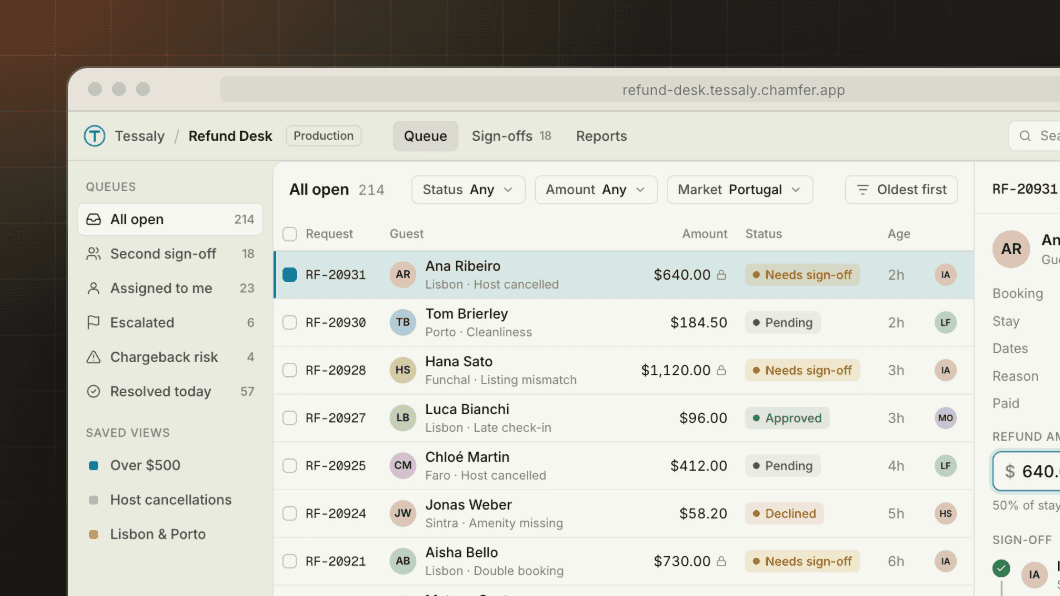
Give agents one queue with the ticket, the order, the payment and the account in view, and only the actions they're allowed to take. Refunds and credits above a limit wait for a second approver.


Context in one screen
Tickets from Zendesk sit beside orders, charges and account history, so agents stop switching tabs to answer one question.
Actions with limits
Agents can refund, credit, reship or change a plan within their limits. Above them, a team lead approves.
Every case on record
Each action is logged with the agent, the amount and the reason, and written back to the ticket.
01 — In production
How Tessaly put 40 agents on a new refund queue in 4 days
“We described our refunds queue in one paragraph on Monday. By Thursday, 40 agents were working it behind SSO, and every action was logged.”
Ines Albrecht
Support Operations Lead, Tessaly
Read the story










02 — Example apps
Queues support teams run on Chamfer

03 — What it includes
What agents get, and what team leads control
Queues by rule
Order and route cases by age, value, language or SLA, and rebalance them as agents log on and off.
AI summaries and drafts
A model step summarizes the thread and drafts a reply, and the agent edits it before sending.
Limits per role
Set how much each role can refund or credit, and route anything above it to a team lead.
SLA timers
Every case shows its time to breach, and cases close to it rise to the top of the queue.
Macros that act
One button can refund the charge, tag the ticket and send the customer a template reply.
Quality review
Team leads sample closed cases, score them and leave feedback in the same app.


05 — FAQ
What teams ask about support queues
Do agents stop using Zendesk?
How do refund limits work?
Can AI draft replies?
Can agents see card or health details?
Can we measure handling time?
How long does a queue take to build?
06 — More use cases