Changelog
What shipped, where it runs and which plans get it.
Running Chamfer Onsite? Read the upgrade guide and the Onsite release notes.
All
AI
Apps
Jobs
Integrations
Security
Onsite
New
AI
Cloud
v2026.09.0
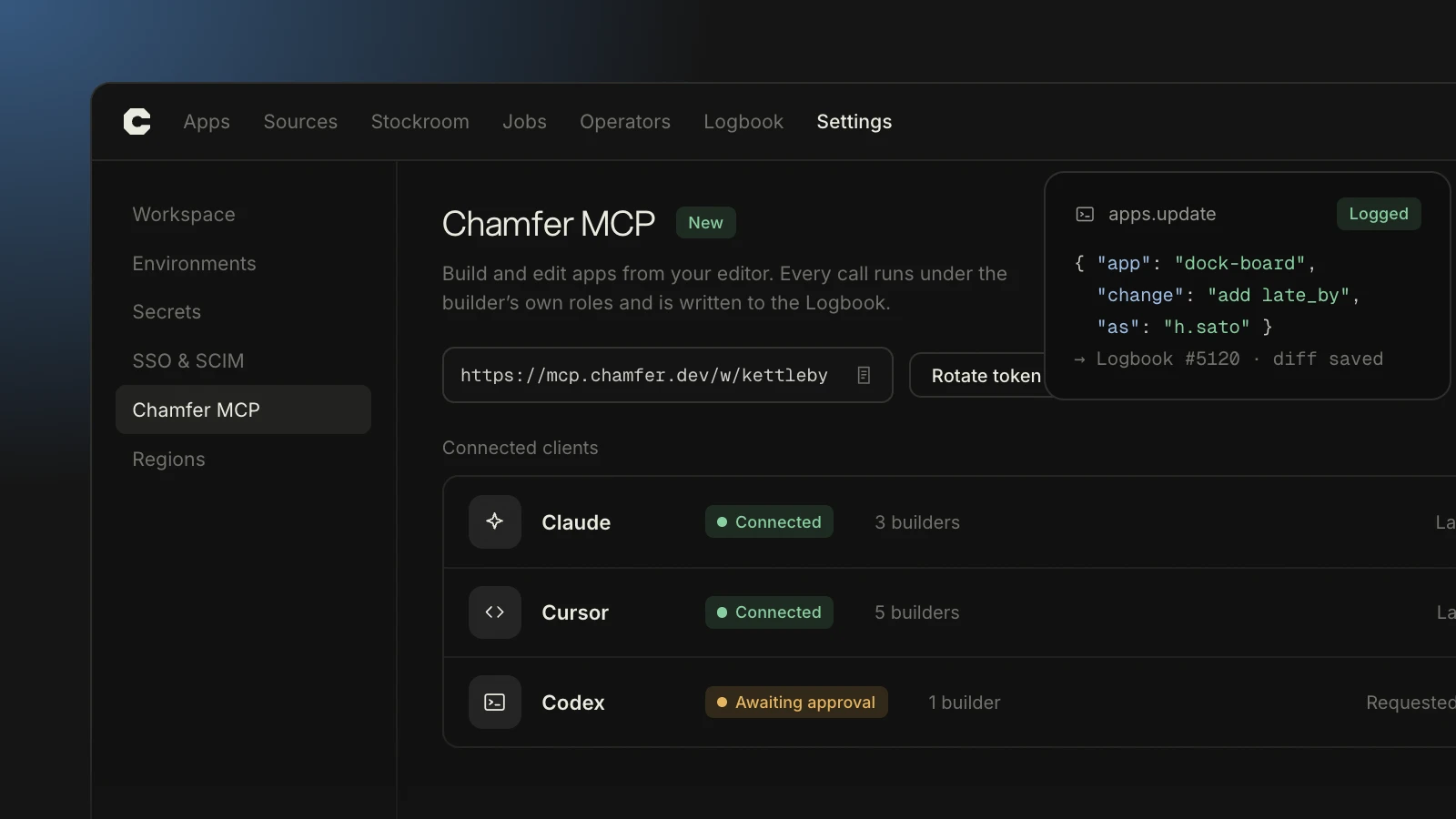
Chamfer MCP: build from Claude, Cursor or Codex
Available now
•
All plans
Chamfer MCP connects Claude Code, Cursor and Codex to your workspace. From the editor you can list apps and data sources, create an app from a prompt, change a screen, query or permission, run a query against staging, and open a release for review.
Sessions sign in through your identity provider and act with your role, so an editor can do exactly what you can do in the browser and nothing more. Every action is written to the Logbook with your name, the client and the prompt.
One server URL per workspace:
https://your-team.chamfer.dev/mcpAdmins can see and revoke connected clients under Settings → Connections
Edits use your plan’s monthly credits; queries use none
Chamfer MCP: build from Claude, Cursor or Codex
Available now
•
All plans
Chamfer MCP connects Claude Code, Cursor and Codex to your workspace. From the editor you can list apps and data sources, create an app from a prompt, change a screen, query or permission, run a query against staging, and open a release for review.
Sessions sign in through your identity provider and act with your role, so an editor can do exactly what you can do in the browser and nothing more. Every action is written to the Logbook with your name, the client and the prompt.
One server URL per workspace:
https://your-team.chamfer.dev/mcpAdmins can see and revoke connected clients under Settings → Connections
Edits use your plan’s monthly credits; queries use none
Fixed
Onsite
Onsite stable
v2026.08.3
Chamfer Onsite 2026.08.3
A patch for the stable channel, recommended for every Onsite install on 2026.08.x.
Fixed SCIM group sync skipping users whose display name contains a comma
Fixed Stockroom nightly backups failing when a branch name runs past 63 characters
Fixed
helm upgraderesetting custom ingress annotationsLogbook export to S3 now retries when throttled instead of dropping the batch
Updated the bundled Postgres to 16.4
Chamfer Onsite 2026.08.3
A patch for the stable channel, recommended for every Onsite install on 2026.08.x.
Fixed SCIM group sync skipping users whose display name contains a comma
Fixed Stockroom nightly backups failing when a branch name runs past 63 characters
Fixed
helm upgraderesetting custom ingress annotationsLogbook export to S3 now retries when throttled instead of dropping the batch
Updated the bundled Postgres to 16.4
New
Security
Cloud and Onsite
v2026.08.0
Specs, written in plain English
Rolling out
•
Enterprise
Specs are company-wide rules that every Chamfer app follows while it’s being built, written as plain sentences: “never show the salary column outside People” or “refunds over $500 need a second approver from Finance.”
Chamfer turns each rule into permissions, sign-off steps or Logbook fields on every app it covers, including apps built later. Rules are versioned, and changing one needs an approver like any other release.
New rules run in report-only mode for 7 days. The Logbook lists every app and query a rule would have changed, so nothing is blocked until you’ve seen the effect.
Rolling out to Enterprise workspaces on cloud and Onsite through September 30.

Specs, written in plain English
Rolling out
•
Enterprise
Specs are company-wide rules that every Chamfer app follows while it’s being built, written as plain sentences: “never show the salary column outside People” or “refunds over $500 need a second approver from Finance.”
Chamfer turns each rule into permissions, sign-off steps or Logbook fields on every app it covers, including apps built later. Rules are versioned, and changing one needs an approver like any other release.
New rules run in report-only mode for 7 days. The Logbook lists every app and query a rule would have changed, so nothing is blocked until you’ve seen the effect.
Rolling out to Enterprise workspaces on cloud and Onsite through September 30.
New
Apps
Cloud
v2026.07.0
Refit now supports Next.js
Available now
•
Team and up
Refit now accepts Next.js 13 and later, on both the App Router and the Pages Router. Connect a GitHub repository or upload a .zip, and the scan returns a report in about two minutes.
The report lists what will change before anything does: keys to move into your secret store, routes with no auth check, direct writes to production tables and packages with known CVEs. Once a person approves it, the app runs behind your SSO with roles and Logbook entries in place.
Route checks that understand Next.js middleware
Findings grouped by fix, with a suggested change for each
Your components and routes stay as they are
Refit now supports Next.js
Available now
•
Team and up
Refit now accepts Next.js 13 and later, on both the App Router and the Pages Router. Connect a GitHub repository or upload a .zip, and the scan returns a report in about two minutes.
The report lists what will change before anything does: keys to move into your secret store, routes with no auth check, direct writes to production tables and packages with known CVEs. Once a person approves it, the app runs behind your SSO with roles and Logbook entries in place.
Route checks that understand Next.js middleware
Findings grouped by fix, with a suggested change for each
Your components and routes stay as they are
New
AI
Cloud and Onsite
v2026.06.0
Operators are generally available
Available now
•
Business and up
Operators, Chamfer’s agents, are out of beta. An Operator works a queue on a named person’s authority: triaging claims, drafting refund decisions, or pulling similar past cases for a reviewer.
Each Operator is limited to the tables and actions you list, and every step it takes is written to the Logbook. Writes to sensitive tables can wait for a person to approve them. Revoking an Operator stops it at its next step.
Business plans include 100 Operator hours a month
Choose the model per Operator, or use your own key on Enterprise
A new activity view shows each run step by step, with inputs and outputs
Operators are generally available
Available now
•
Business and up
Operators, Chamfer’s agents, are out of beta. An Operator works a queue on a named person’s authority: triaging claims, drafting refund decisions, or pulling similar past cases for a reviewer.
Each Operator is limited to the tables and actions you list, and every step it takes is written to the Logbook. Writes to sensitive tables can wait for a person to approve them. Revoking an Operator stops it at its next step.
Business plans include 100 Operator hours a month
Choose the model per Operator, or use your own key on Enterprise
A new activity view shows each run step by step, with inputs and outputs
Release notes in your inbox, twice a month
Two emails a month at most. Every one has a one-click unsubscribe.
Subscribing means you accept our Terms and Privacy Policy.